

A free integration from Metanous
Basketball Flanders in your AI assistant
Imagine this: you open your AI assistant, type "When is Donza's next home game?" and get an immediate, accurate answer straight from the official Basketball Flanders database. No searching websites, no switching apps—just ask and know.
That's exactly what we've built. And we make it available for free to everyone who loves basketball.
From the court to the code
At Metanous, it’s all about AI-driven software and data solutions—but behind the company are people with a real passion for sports. We have been sponsoring Donza, the basketball club from De Pinte, for years and enjoy following their games.
This combination of technical expertise and basketball passion led us to ask ourselves: what if we made Basketball Flanders’ data directly available in the AI tools people use every day?
The answer to that question is this integration.
What exactly can you do with it?
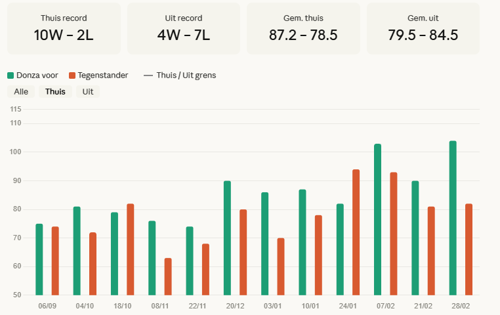
Once you’ve activated the integration in your AI assistant, you can simply ask questions about Flemish basketball in plain language. Below are some example questions and their corresponding answers:


Why are we offering this for free?
Over the past year and a half, Metanous has built significant expertise in AI: how to deploy it, how to make it safe, how to connect it to existing systems and data, and how to create real value for organizations.
This Basketball Flanders integration is one concrete example of what’s possible. The underlying technology — accessing external data via a so-called MCP server — is the exact same approach we use for our clients in other sectors.
We’re happy to share this with the basketball community simply because we’re excited about it ourselves. And perhaps it will spark the question for other organizations: what can we do with our data? If you have that question, feel free to contact us.
How do you activate it?
The integration works in any environment that supports MCP servers, such as Claude or ChatGPT. Installation takes only a few minutes. Below is a short guide on how to activate this integration within Claude.
1. Open the settings
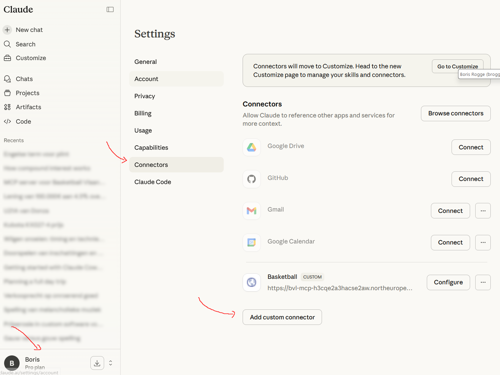
2. Add a custom connector
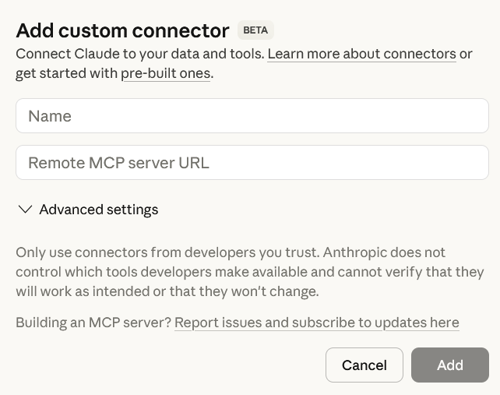
3. Fill in the details below
Name: Basketball Flanders
Remote MCP: https://bvl-mcp-h3cqe2a3hacse2aw.northeurope-01.azurewebsites.net/sse
Using a different environment?
The integration also works in other tools that support MCP, such as Cursor or other LLM clients. The configuration step differs slightly per tool, but the URL remains the same. Need help? Send us a message.
Questions or feedback?
Is something not working as expected? Do you have a suggestion for additional features? Or would you like to know how we can help you further?
